---
title: "AI Note Auditor: Configure Your Activities Reporting View for Auditor Results & Run a Review"
description: Learn how to add columns & filters to your Activities reporting page to surface the Auditor's results at a glance. Quickly filter to see what failed, confirm what passed, and catch anything with an outdated audit before it's submitted.
---
[Skip to content](https://help.hirasmus.com/knowledge/ai-note-auditor-configure-your-activities-reporting-view-for-ai-audit-results-run-a-review#main-content)
English
Show submenu for translations
[Request Support](https://help.hirasmus.com/knowledge/kb-tickets/new?hsLang=en) [Customer portal](https://help.hirasmus.com/helpdesk?hsLang=en)

Open main navigation
Close main navigation
- English
Show submenu for translations
- [Request Support](https://help.hirasmus.com/knowledge/kb-tickets/new)
- [Customer portal](https://help.hirasmus.com/helpdesk)
- hirasmus.com
hirasmus.com
Hi! How can we help you?
- There are no suggestions because the search field is empty.
1. [Hi Rasmus Help Center](https://help.hirasmus.com/knowledge?hsLang=en)
2. [AI](https://help.hirasmus.com/knowledge/ai?hsLang=en)
3. [AI Note Auditor](https://help.hirasmus.com/knowledge/ai?hsLang=en#ai-note-auditor)
October 6, 2026
# AI Note Auditor: Configure Your Activities Reporting View for Auditor Results & Run a Review
## You can add columns & filters to a table view that surface the Auditor's results at a glance — without opening each note individually after running a review. These views let your team triage a whole batch of notes at once: quickly filter to see what failed, confirm what passed, and catch anything with an outdated audit before it's submitted.
To begin using the AI Note Auditor, please navigate to your organizations \[Subscription\] page. Select \[Edit Subscription\]. Under the \[Add-Ons\] section, toggle on 'AI Note Auditor'.
[Click here](https://help.hirasmus.com/knowledge/ai-note-auditor-configure-privileges-pre-signature-feedback-workflow?hsLang=en) to learn more about configuring privileges.
[Click here](https://help.hirasmus.com/knowledge/ai-note-auditor-getting-started-guide?hsLang=en) for the "AI Note Auditor: Getting Started Guide" – outlining frequently asked questions.
Skip to running a review with AI. Click [**here**](https://help.hirasmus.com/knowledge/ai-note-auditor-configure-your-activities-reporting-view-for-ai-audit-results-run-a-review#runreview).
### **Configure the Activities Reporting View**
#### **Part 1. Add AI Note Auditor Columns to View Results**
1. On the left hand-menu, select **\[Reporting\]** \>\> **\[Activities**\].
2. Select theon the far right of the table.
3. A modal will pop up, scroll down and select the **\[AI Note Auditor\]**.
4. In the drop down menu, select **\[Select all\]** to bulk select all four columns for display.

5. Scroll down and select **\[Save\]** to add the columns.
6. These columns are available to add to the following pages, as well:
1. Client's \[**History**\] page, user's \[**My Activities**\] and \[**Pending Signatures**\] page, when access is enabled via \[**User Privileges**\].
#### **Column Descriptions:**
##### **\[AI Audit Result\]** Column:
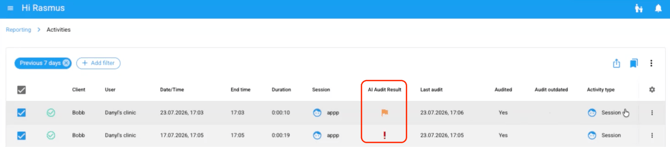
- - Shows the outcome of the AI audit review: *Passed, Flagged,* or *Failed*. *Blank* means the session hasn't been reviewed yet.
- **Flagged:** something a payor would likely ask about.
- **Failed**: something a payor would likely deny.
- **Passed**: nothing found that would likely lead to a denial.
- - In the example below, the first session was flagged (orange flag icon) and the second failed (red exclamation mark).
##### **\[Last Audit\]** Column:
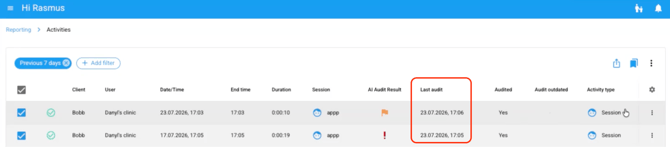
- - Shows the date and time each session was last reviewed by the AI note auditor, as seen in the example below.
##### **\[Audited\]** Column:
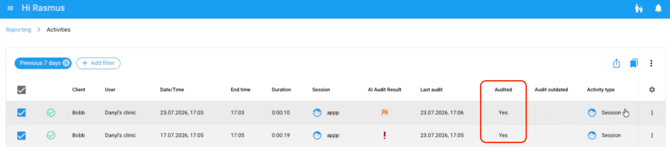
- - Shows if the session was audited (Yes/No).
- In the example below, we see both sessions were audited, as indicated by “Yes”.
##### **\[Audit Outdated\]** Column:
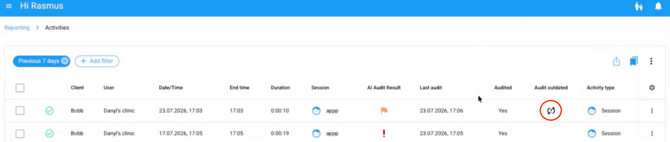
- - Shows whether the session has been updated since its last audit, indicated by an icon. Blank means no update.
- In the example below, the first session was updated; the second was not.
#### **Part 2: Add Additional Filter Options**
Once the audit result columns are added to your table view, you can filter by them to quickly narrow down to the notes that need attention.
1. Select the \[+ **Add Filter\]** button
2. Scroll down and open the \[**AI Note Auditor**\] folder.
3. Choose from the four available filters:
- - **Audit Result** (Fail, Flag, Pass, No current result),
- **Last Audit Run** (date/time range),
- **Audited** (audited vs. not audited),
- **Outdated** (outdated vs. up to date).
4. Apply one or more filters together to narrow the table to exactly the notes you need.
**💡 TIP**: You can save this filtered view for future audits!
Select the  and click **\[Save Current View...\]**.
Title the view and choose visibility using the checkboxes.
[Click here](https://help.hirasmus.com/knowledge/ai-note-auditor-configure-your-activities-reporting-view-for-ai-audit-results-run-a-review?hsLang=en) to learn more about auditing activities and saving filtered views.
### **Run Notes through Review with AI**
#### To run an AI audit review, you *must select at least **one** **completed** **session** or **supervision** activity* *type*. Once selected, the \[**Review with AI**\] option is enabled to click.
❗If no eligible activities are selected in the Activities table the **\[Review with AI**\] option will be greyed out, with a tooltip prompt: **“Select at least one session or supervision activity to review”.**
1. Select at least one *session* or *supervision* *activity type* in the *completed status.*
2. Select the 3 vertical dots in the top right of the table.
3. Select **\[Review with AI\].**
**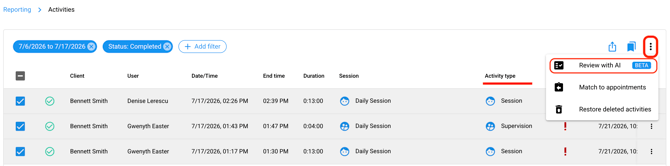**
4. The AI Note Auditor modal pop up will appear.
1. Select your \[**Audit focus areas**\] and \[**Audit strictness\].**
2. Select **\[Audit Notes\]** at the bottom right.**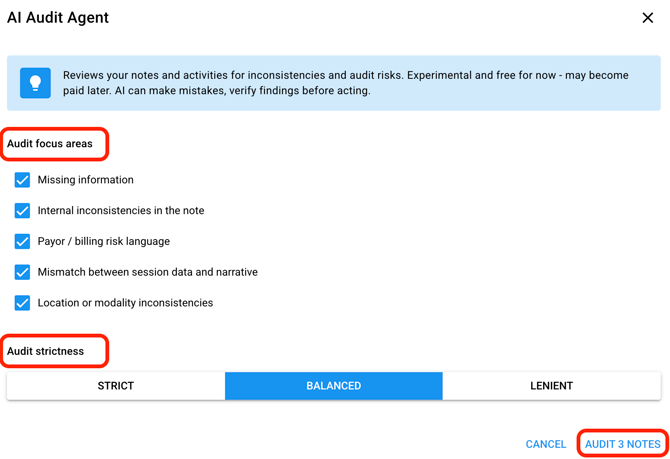**
You can choose a **Balanced** (default), **Strict** or **Lenient** setting to control how readily the Auditor flags or fails notes.
❗If there are ineligible selections, the AI Note Auditor modal banner will read: **"Only session and supervision activities can be audited"** and indicate how many of the selected activities are eligible and will be audited.
Ineligible activities will not be included in the audit review.
- [Getting Started](https://help.hirasmus.com/knowledge/getting-started?hsLang=en#main-content)
- [Quickstart Guide](https://help.hirasmus.com/knowledge/getting-started?hsLang=en#quickstart-guide)
- [Hi Rasmus 101: Using Hi Rasmus as a Behavior Technician](https://help.hirasmus.com/knowledge/getting-started?hsLang=en#hi-rasmus-101-using-hi-rasmus-as-a-behavior-technician)
- [Hi Rasmus 201: Hi Rasmus Guide for BCBAs / Behavior Analysts](https://help.hirasmus.com/knowledge/getting-started?hsLang=en#hi-rasmus-201-hi-rasmus-guide-for-bcbas-behavior-analysts)
- [Hi Rasmus 101: Using Hi Rasmus in a Multi-Disciplinary Setting](https://help.hirasmus.com/knowledge/getting-started?hsLang=en#hi-rasmus-101-using-hi-rasmus-in-a-multi-disciplinary-setting)
- [Managing Clients & Users](https://help.hirasmus.com/knowledge/managing-clients-users?hsLang=en#main-content)
- [Managing Clients](https://help.hirasmus.com/knowledge/managing-clients-users?hsLang=en#managing-clients)
- [Managing Users](https://help.hirasmus.com/knowledge/managing-clients-users?hsLang=en#managing-users)
- [Client \<\> User Access](https://help.hirasmus.com/knowledge/managing-clients-users?hsLang=en#client-user-access)
- [User Privileges](https://help.hirasmus.com/knowledge/managing-clients-users?hsLang=en#user-privileges)
- [Multi-factor Authentication (MFA)](https://help.hirasmus.com/knowledge/managing-clients-users?hsLang=en#multi-factor-authentication-mfa)
- [Single Sign On](https://help.hirasmus.com/knowledge/managing-clients-users?hsLang=en#single-sign-on)
- [Staff Licenses](https://help.hirasmus.com/knowledge/staff-licenses?hsLang=en)
- [Creating Programs](https://help.hirasmus.com/knowledge/creating-programs?hsLang=en#main-content)
- [Your Program Library](https://help.hirasmus.com/knowledge/creating-programs?hsLang=en#your-program-library)
- [Program Setup: Prompt Levels and Workflows](https://help.hirasmus.com/knowledge/creating-programs?hsLang=en#program-setup-prompt-levels-and-workflows)
- [Program Setup: Program Building Blocks](https://help.hirasmus.com/knowledge/creating-programs?hsLang=en#program-setup-program-building-blocks)
- [Creating Programs by Type](https://help.hirasmus.com/knowledge/creating-programs?hsLang=en#creating-programs-by-type)
- [Specific Program Capabilities](https://help.hirasmus.com/knowledge/creating-programs?hsLang=en#specific-program-capabilities)
- [Featured Programs and Library Catalog](https://help.hirasmus.com/knowledge/creating-programs?hsLang=en#featured-programs-and-library-catalog)
- [Client Progress](https://help.hirasmus.com/knowledge/client-progress?hsLang=en#main-content)
- [Reviewing Client Data](https://help.hirasmus.com/knowledge/client-progress?hsLang=en#reviewing-client-data)
- [Program Modifications](https://help.hirasmus.com/knowledge/client-progress?hsLang=en#program-modifications)
- [Client Progress Reports](https://help.hirasmus.com/knowledge/client-progress?hsLang=en#client-progress-reports)
- [Assessment Results](https://help.hirasmus.com/knowledge/client-progress?hsLang=en#assessment-results)
- [Exporting Data](https://help.hirasmus.com/knowledge/client-progress?hsLang=en#exporting-data)
- [Operational Tools, Reporting and Auditing](https://help.hirasmus.com/knowledge/operational-tools-reporting-and-auditing?hsLang=en#main-content)
- [Single Client Reporting / Auditing](https://help.hirasmus.com/knowledge/operational-tools-reporting-and-auditing?hsLang=en#single-client-reporting-auditing)
- [Cross Client Reporting / Auditing (Premium)](https://help.hirasmus.com/knowledge/operational-tools-reporting-and-auditing?hsLang=en#cross-client-reporting-auditing-premium)
- [Activity Time Change Requests](https://help.hirasmus.com/knowledge/operational-tools-reporting-and-auditing?hsLang=en#activity-time-change-requests)
- [Sessions](https://help.hirasmus.com/knowledge/sessions?hsLang=en#main-content)
- [Setting Up a Client Session](https://help.hirasmus.com/knowledge/sessions?hsLang=en#setting-up-a-client-session)
- [Running a Client Session](https://help.hirasmus.com/knowledge/sessions?hsLang=en#running-a-client-session)
- [Completing Session Notes](https://help.hirasmus.com/knowledge/sessions?hsLang=en#completing-session-notes)
- [Group Sessions](https://help.hirasmus.com/knowledge/sessions?hsLang=en#group-sessions)
- [Reviewing and Editing Sessions / Activities](https://help.hirasmus.com/knowledge/sessions?hsLang=en#reviewing-and-editing-sessions-activities)
- [Supervision Mode](https://help.hirasmus.com/knowledge/supervision-mode?hsLang=en#main-content)
- [Supervision Criteria](https://help.hirasmus.com/knowledge/supervision-mode?hsLang=en#supervision-criteria)
- [Supervising Live Sessions](https://help.hirasmus.com/knowledge/supervision-mode?hsLang=en#supervising-live-sessions)
- [Supervision Session Notes](https://help.hirasmus.com/knowledge/supervision-mode?hsLang=en#supervision-session-notes)
- [Templates](https://help.hirasmus.com/knowledge/templates?hsLang=en#main-content)
- [Session Notes](https://help.hirasmus.com/knowledge/templates?hsLang=en#session-notes)
- [Forms](https://help.hirasmus.com/knowledge/templates?hsLang=en#forms)
- [Treatment Plans and Progress Reports](https://help.hirasmus.com/knowledge/templates?hsLang=en#treatment-plans-and-progress-reports)
- [Activity Types](https://help.hirasmus.com/knowledge/templates?hsLang=en#activity-types)
- [Integrations](https://help.hirasmus.com/knowledge/integrations?hsLang=en#main-content)
- [Aloha ABA Integration](https://help.hirasmus.com/knowledge/integrations?hsLang=en#aloha-aba-integration)
- [Aloha Integration: FAQ And Troubleshooting](https://help.hirasmus.com/knowledge/integrations?hsLang=en#aloha-integration-faq-and-troubleshooting)
- [Lumary Integration: Overview](https://help.hirasmus.com/knowledge/integrations?hsLang=en#lumary-integration-overview)
- [Lumary Integration: Set Up](https://help.hirasmus.com/knowledge/integrations?hsLang=en#lumary-integration-set-up)
- [Lumary Integration: Running and Reviewing Sessions](https://help.hirasmus.com/knowledge/integrations?hsLang=en#lumary-integration-running-and-reviewing-sessions)
- [Lumary Integration: FAQ and Troubleshooting](https://help.hirasmus.com/knowledge/integrations?hsLang=en#lumary-integration-faq-and-troubleshooting)
- [Boost Integration: Overview](https://help.hirasmus.com/knowledge/integrations?hsLang=en#boost-integration-overview)
- [Boost Integration: Set Up](https://help.hirasmus.com/knowledge/integrations?hsLang=en#boost-integration-set-up)
- [Boost Integration: Running and Reviewing Sessions](https://help.hirasmus.com/knowledge/integrations?hsLang=en#boost-integration-running-and-reviewing-sessions)
- [Boost Integration: FAQ and Troubleshooting](https://help.hirasmus.com/knowledge/integrations?hsLang=en#boost-integration-faq-and-troubleshooting)
- [Camber Integration: Overview](https://help.hirasmus.com/knowledge/integrations?hsLang=en#camber-integration-overview)
- [Camber Integration: Set up](https://help.hirasmus.com/knowledge/integrations?hsLang=en#camber-integration-set-up)
- [Camber: Running and Reviewing Sessions](https://help.hirasmus.com/knowledge/integrations?hsLang=en#camber-running-and-reviewing-sessions)
- [Camber: FAQ and Troubleshooting](https://help.hirasmus.com/knowledge/integrations?hsLang=en#camber-faq-and-troubleshooting)
- [TherapyPM](https://help.hirasmus.com/knowledge/integrations?hsLang=en#therapypm)
- [Offline Mode](https://help.hirasmus.com/knowledge/offline-mode?hsLang=en)
- [Parents](https://help.hirasmus.com/knowledge/parents?hsLang=en)
- [RBT Training](https://help.hirasmus.com/knowledge/rbt-training?hsLang=en)
- [Outcomes](https://help.hirasmus.com/knowledge/outcomes?hsLang=en#main-content)
- [Data Accessibility](https://help.hirasmus.com/knowledge/outcomes?hsLang=en#data-accessibility)
- [AI](https://help.hirasmus.com/knowledge/ai?hsLang=en#main-content)
- [AI Note Auditor](https://help.hirasmus.com/knowledge/ai?hsLang=en#ai-note-auditor)
- [Scheduling](https://help.hirasmus.com/knowledge/scheduling?hsLang=en#main-content)
- [🏁 Scheduling: Getting Started](https://help.hirasmus.com/knowledge/scheduling?hsLang=en#scheduling-getting-started)
- [🛠️ Scheduling: Set Up](https://help.hirasmus.com/knowledge/scheduling?hsLang=en#%EF%B8%8F-scheduling-set-up)
- [⚙️ Scheduling: Calendar Views and Settings](https://help.hirasmus.com/knowledge/scheduling?hsLang=en#%EF%B8%8F-scheduling-calendar-views-and-settings)
- [📆 Scheduling: Creating and Updating Appointments and Events](https://help.hirasmus.com/knowledge/scheduling?hsLang=en#scheduling-creating-and-updating-appointments-and-events)
- [✅ Scheduling: Completing Scheduled Appointments](https://help.hirasmus.com/knowledge/scheduling?hsLang=en#scheduling-completing-scheduled-appointments)
- [📈 Scheduling: Appointments Reporting](https://help.hirasmus.com/knowledge/scheduling?hsLang=en#scheduling-appointments-reporting)
- [Frequently Asked Questions](https://help.hirasmus.com/knowledge/frequently-asked-questions?hsLang=en#main-content)
- [Subscription and Invoices](https://help.hirasmus.com/knowledge/frequently-asked-questions?hsLang=en#subscription-and-invoices)
- [Device and App Info](https://help.hirasmus.com/knowledge/frequently-asked-questions?hsLang=en#device-and-app-info)
- [Recovering Deleted Items](https://help.hirasmus.com/knowledge/frequently-asked-questions?hsLang=en#recovering-deleted-items)
- [Settings](https://help.hirasmus.com/knowledge/settings?hsLang=en)
- [New and Coming Soon!](https://help.hirasmus.com/knowledge/new-and-coming-soon?hsLang=en#main-content)
- [Coming Soon](https://help.hirasmus.com/knowledge/new-and-coming-soon?hsLang=en#coming-soon)
[](https://hirasmus.com)
Help Center
Copyright © 2026, Hi Rasmus Inc.