---
title: "Overview: Automatic Mastery Workflows"
description: Learn how to set up workflows to automatically move your targets to the next status based on the mastery criteria you prefer!
---
[Skip to content](https://help.hirasmus.com/knowledge/automatic-mastery-workflows#main-content)
English
Show submenu for translations
[Request Support](https://help.hirasmus.com/knowledge/kb-tickets/new?hsLang=en) [Customer portal](https://help.hirasmus.com/helpdesk?hsLang=en)

Open main navigation
Close main navigation
- English
Show submenu for translations
- [Request Support](https://help.hirasmus.com/knowledge/kb-tickets/new)
- [Customer portal](https://help.hirasmus.com/helpdesk)
- hirasmus.com
hirasmus.com
Hi! How can we help you?
- There are no suggestions because the search field is empty.
1. [Hi Rasmus Help Center](https://help.hirasmus.com/knowledge?hsLang=en)
2. [Creating Programs](https://help.hirasmus.com/knowledge/creating-programs?hsLang=en)
3. [Program Setup: Prompt Levels and Workflows](https://help.hirasmus.com/knowledge/creating-programs?hsLang=en#program-setup-prompt-levels-and-workflows)
June 12, 2026
# Overview: Automatic Mastery Workflows
## Learn how to set up workflows to automatically move your targets to the next status based on the mastery criteria you prefer!
### Setting Up Workflows for your Organization
⚠️ Manager level users and Supervisor level users can access workflow templates
💡A workflow template's mastery criteria can be customized per client program, once a template is assigned to a program
#### 📹 Watch: Setting Up Workflows
#### Steps for Setting Up Workflows
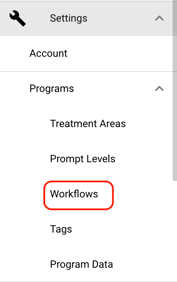
- To manage your mastery criteria and automatic workflow, navigate to  \[Settings\] \>\> \[Programs\] \>\> \[Workflows\]from the left hand navigation menu.
#### 
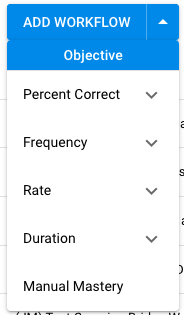
- Select **\[Add Workflow\]**OR select the dropdown arrow next to **\[Add Workflow\]** to select a specific workflow type.
If you select **\[Add Workflow\] it will default to \[Increase Percent Correct\]**
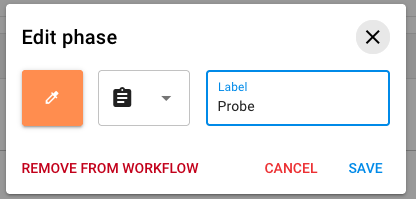
- Select the pencil icon next to each phase name to either edit the name of the phase, color, or icon, or to remove that phase from the workflow
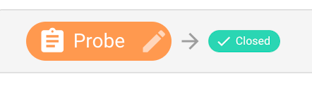
- Editing the name will customize the target status names. Removing the phase from the workflow will skip that phase altogether
Probe Phase Setup
- Start by setting your mastering accuracy for the **\[Probe\]** phase.
- In this example we can see that the target needs to have a **100% success rate** across **1 session** and there must be a minimum of **3 trials** collected.

ℹ️ **Notes on Minimum Trials:**
- If you set a minimum number of trials, the target will display the minimum number when it is run in a session.
- When the minimum number of trials are met on a target, the target will turn green
- If the minimum number of trials are not met in a session, the session won't count towards the workflow, even if the mastering accuracy is met.
- Workflows are the only way you can set and display a minimum number of trials on a target
- Select **\[Advanced\]** Settings to set up additional criteria
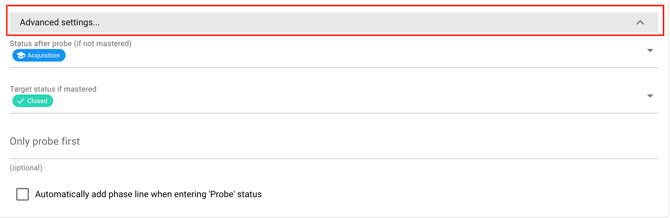
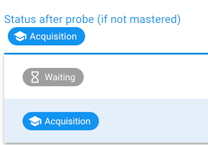
- In the first dropdown, select the phase/status your target should move to if the mastery criteria is NOT met in the probe phase.
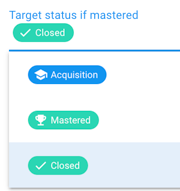
- In the second dropdown, select the phase/status your target should move to if the mastering criteria IS met in the probe phase.
- Only Probe First: This is an optional setting. If you would like the mastery criteria to ONLY apply to the first X amount of trials, add the number of trials here.
- If you enable only probe first, the workflow will only take into account the number of trials you specify in this field.
- **For example:** If you specify only probe first **3 trials** and the first **3 trials** are NOT successful, but 4th, 5th and 6th trials ARE successful, the workflow will **NOT** consider the 4th, 5th and 6th trials and will **NOT** consider that target eligible to move to the next phase.

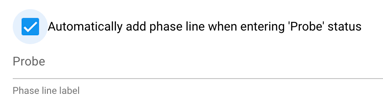
- Check the box to automatically add a phase line to the program's graph when entering "Probe" Status. You can specify what the phase line should be labeled.
- 💡 Note that your first target in a program must manually be opened (put in a probe or acquisition status), so the phase line label will **not** apply to the first target that is opened.
Acquisition Phase Setup
- Set up your mastery criteria for the **\[Acquisition\]** phase
- In this example, the learner must reach an 80% success rate across 3 sessions and in each session, the target must have a minimum of 1 trial run.
- Select **\[Advanced Settings\]** to:
- **Setup only probe first criteria**: This functions the same way as in the \[Probe\] phase. If this is set up, the workflow will only take into consideration the number of trails specified.
- Automatically Add a phase change line
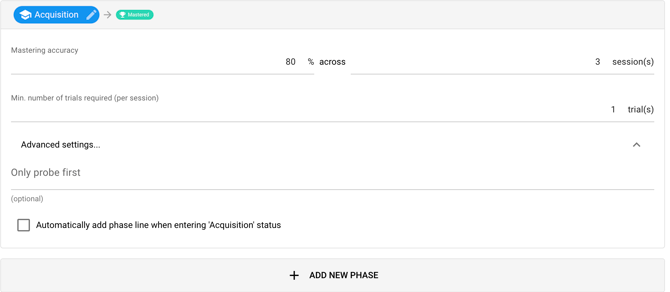
- If you'd like to add multiple **\[Acquisition\]** phases you can select **\[Add New Phase\]** and name the additional phase whatever you prefer.
### Mastered Phase / Maintenance Intervals
Once a target meets **ALL mastery criteria** during a session **AND** that session is finished by the user, the system will automatically move the target into its maintenance interval (as defined by the clinician).
Key Details:
- The transition into maintenance happens **immediately in the next session**, regardless of whether the interval is set to weekly, monthly, or otherwise.
- On the day that maintenance targets are scheduled to show in session, they will show for **all sessions throughout that day**.
For example:
- - If a target is set to move into **weekly maintenance**, it will still appear in the *next session* under **Mastered**.
- Once data is collected for that target in the next session and that day ends, the interval begins.
- From that point forward, the target will follow the interval cadence (e.g., not appear again for 1 week or 1 month).
- The workflow will default to a **\[Daily\]** interval. To add additional intervals select **\[Add Maintenance Interval\]**
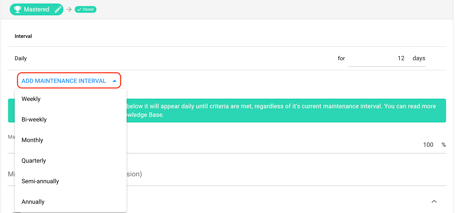
- Once you've added an additional interval, you can remove the default daily interval if you wish by selecting the \[trash\] icon.

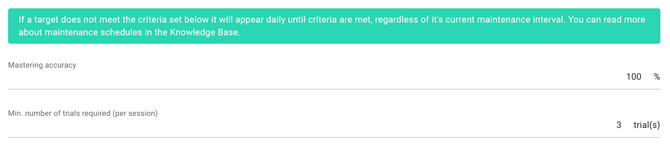
- Specify the maintenance criteria.
- You can set a mastering accuracy and a minimum number of trials. If the criteria is not met, the target will show up in a session each day until they are met, regardless of the maintenance interval.
- Example: if the criteria is 100% and the learner continues to score 90% or lower, it will appear in every session until 100% is met
- Under advanced settings, you can select to automatically add a phase line to the program graph once the target reaches the **\[Mastered\]** status.

- If you would like the target to revert to the **\[Acquisition\]** phase if the maintenance criteria is not met, check the **\[Mastered\] \> \[Acquisition\]** box.
- You'll need to also specify when the target should revert. The target will revert after criteria is **NOT** met across \[X\] number of sessions.

Auto-Open \[Waiting\] Targets
To automatically open new targets that are still in \[Waiting\] status, check the box to \[Automatically open new targets when targets are mastered\]
- Specify the maximum number of targets within a program that you would like to have in acquisition at a given time.
- If you enter in **\[2 targets\]** here, two targets will open when the previous target is Mastered.

- Choose the status you would like newly opened targets to default to

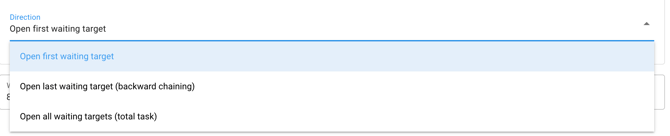
- You can also specify the direction in which the targets open: first waiting target, last waiting target or you can choose to open all waiting targets.
ℹ️ Note: If you are using a workflow on a Set of Targets or Task Analysis Targets, the workflow will only apply to the sub targets
ℹ️Note: if a workflow is set to move a target from Probe -\> Closed, and the option to, "Automatically open new targets when targets are mastered" is selected, the functionality will still open new targets in Waiting when previous ones go from Probe -\> Closed.
- [Getting Started](https://help.hirasmus.com/knowledge/getting-started?hsLang=en#main-content)
- [Quickstart Guide](https://help.hirasmus.com/knowledge/getting-started?hsLang=en#quickstart-guide)
- [Hi Rasmus 101: Using Hi Rasmus as a Behavior Technician](https://help.hirasmus.com/knowledge/getting-started?hsLang=en#hi-rasmus-101-using-hi-rasmus-as-a-behavior-technician)
- [Hi Rasmus 201: Hi Rasmus Guide for BCBAs / Behavior Analysts](https://help.hirasmus.com/knowledge/getting-started?hsLang=en#hi-rasmus-201-hi-rasmus-guide-for-bcbas-behavior-analysts)
- [Hi Rasmus 101: Using Hi Rasmus in a Multi-Disciplinary Setting](https://help.hirasmus.com/knowledge/getting-started?hsLang=en#hi-rasmus-101-using-hi-rasmus-in-a-multi-disciplinary-setting)
- [Managing Clients & Users](https://help.hirasmus.com/knowledge/managing-clients-users?hsLang=en#main-content)
- [Managing Clients](https://help.hirasmus.com/knowledge/managing-clients-users?hsLang=en#managing-clients)
- [Managing Users](https://help.hirasmus.com/knowledge/managing-clients-users?hsLang=en#managing-users)
- [Client \<\> User Access](https://help.hirasmus.com/knowledge/managing-clients-users?hsLang=en#client-user-access)
- [User Privileges](https://help.hirasmus.com/knowledge/managing-clients-users?hsLang=en#user-privileges)
- [Multi-factor Authentication (MFA)](https://help.hirasmus.com/knowledge/managing-clients-users?hsLang=en#multi-factor-authentication-mfa)
- [Single Sign On](https://help.hirasmus.com/knowledge/managing-clients-users?hsLang=en#single-sign-on)
- [Staff Licenses](https://help.hirasmus.com/knowledge/staff-licenses?hsLang=en)
- [Creating Programs](https://help.hirasmus.com/knowledge/creating-programs?hsLang=en#main-content)
- [Your Program Library](https://help.hirasmus.com/knowledge/creating-programs?hsLang=en#your-program-library)
- [Program Setup: Prompt Levels and Workflows](https://help.hirasmus.com/knowledge/creating-programs?hsLang=en#program-setup-prompt-levels-and-workflows)
- [Program Setup: Program Building Blocks](https://help.hirasmus.com/knowledge/creating-programs?hsLang=en#program-setup-program-building-blocks)
- [Creating Programs by Type](https://help.hirasmus.com/knowledge/creating-programs?hsLang=en#creating-programs-by-type)
- [Specific Program Capabilities](https://help.hirasmus.com/knowledge/creating-programs?hsLang=en#specific-program-capabilities)
- [Featured Programs and Library Catalog](https://help.hirasmus.com/knowledge/creating-programs?hsLang=en#featured-programs-and-library-catalog)
- [Client Progress](https://help.hirasmus.com/knowledge/client-progress?hsLang=en#main-content)
- [Reviewing Client Data](https://help.hirasmus.com/knowledge/client-progress?hsLang=en#reviewing-client-data)
- [Program Modifications](https://help.hirasmus.com/knowledge/client-progress?hsLang=en#program-modifications)
- [Client Progress Reports](https://help.hirasmus.com/knowledge/client-progress?hsLang=en#client-progress-reports)
- [Assessment Results](https://help.hirasmus.com/knowledge/client-progress?hsLang=en#assessment-results)
- [Exporting Data](https://help.hirasmus.com/knowledge/client-progress?hsLang=en#exporting-data)
- [Operational Tools, Reporting and Auditing](https://help.hirasmus.com/knowledge/operational-tools-reporting-and-auditing?hsLang=en#main-content)
- [Single Client Reporting / Auditing](https://help.hirasmus.com/knowledge/operational-tools-reporting-and-auditing?hsLang=en#single-client-reporting-auditing)
- [Cross Client Reporting / Auditing (Premium)](https://help.hirasmus.com/knowledge/operational-tools-reporting-and-auditing?hsLang=en#cross-client-reporting-auditing-premium)
- [Activity Time Change Requests](https://help.hirasmus.com/knowledge/operational-tools-reporting-and-auditing?hsLang=en#activity-time-change-requests)
- [Sessions](https://help.hirasmus.com/knowledge/sessions?hsLang=en#main-content)
- [Setting Up a Client Session](https://help.hirasmus.com/knowledge/sessions?hsLang=en#setting-up-a-client-session)
- [Running a Client Session](https://help.hirasmus.com/knowledge/sessions?hsLang=en#running-a-client-session)
- [Completing Session Notes](https://help.hirasmus.com/knowledge/sessions?hsLang=en#completing-session-notes)
- [Group Sessions](https://help.hirasmus.com/knowledge/sessions?hsLang=en#group-sessions)
- [Reviewing and Editing Sessions / Activities](https://help.hirasmus.com/knowledge/sessions?hsLang=en#reviewing-and-editing-sessions-activities)
- [Supervision Mode](https://help.hirasmus.com/knowledge/supervision-mode?hsLang=en#main-content)
- [Supervision Criteria](https://help.hirasmus.com/knowledge/supervision-mode?hsLang=en#supervision-criteria)
- [Supervising Live Sessions](https://help.hirasmus.com/knowledge/supervision-mode?hsLang=en#supervising-live-sessions)
- [Supervision Session Notes](https://help.hirasmus.com/knowledge/supervision-mode?hsLang=en#supervision-session-notes)
- [Templates](https://help.hirasmus.com/knowledge/templates?hsLang=en#main-content)
- [Session Notes](https://help.hirasmus.com/knowledge/templates?hsLang=en#session-notes)
- [Forms](https://help.hirasmus.com/knowledge/templates?hsLang=en#forms)
- [Treatment Plans and Progress Reports](https://help.hirasmus.com/knowledge/templates?hsLang=en#treatment-plans-and-progress-reports)
- [Activity Types](https://help.hirasmus.com/knowledge/templates?hsLang=en#activity-types)
- [Integrations](https://help.hirasmus.com/knowledge/integrations?hsLang=en#main-content)
- [Aloha ABA Integration](https://help.hirasmus.com/knowledge/integrations?hsLang=en#aloha-aba-integration)
- [Aloha Integration: FAQ And Troubleshooting](https://help.hirasmus.com/knowledge/integrations?hsLang=en#aloha-integration-faq-and-troubleshooting)
- [Lumary Integration: Overview](https://help.hirasmus.com/knowledge/integrations?hsLang=en#lumary-integration-overview)
- [Lumary Integration: Set Up](https://help.hirasmus.com/knowledge/integrations?hsLang=en#lumary-integration-set-up)
- [Lumary Integration: Running and Reviewing Sessions](https://help.hirasmus.com/knowledge/integrations?hsLang=en#lumary-integration-running-and-reviewing-sessions)
- [Lumary Integration: FAQ and Troubleshooting](https://help.hirasmus.com/knowledge/integrations?hsLang=en#lumary-integration-faq-and-troubleshooting)
- [TherapyPM](https://help.hirasmus.com/knowledge/integrations?hsLang=en#therapypm)
- [Boost Integration: Overview](https://help.hirasmus.com/knowledge/integrations?hsLang=en#boost-integration-overview)
- [Boost Integration: Set Up](https://help.hirasmus.com/knowledge/integrations?hsLang=en#boost-integration-set-up)
- [Boost Integration: Running and Reviewing Sessions](https://help.hirasmus.com/knowledge/integrations?hsLang=en#boost-integration-running-and-reviewing-sessions)
- [Boost Integration: FAQ and Troubleshooting](https://help.hirasmus.com/knowledge/integrations?hsLang=en#boost-integration-faq-and-troubleshooting)
- [Camber Integration: Overview](https://help.hirasmus.com/knowledge/integrations?hsLang=en#camber-integration-overview)
- [Camber Integration: Set up](https://help.hirasmus.com/knowledge/integrations?hsLang=en#camber-integration-set-up)
- [Camber: Running and Reviewing Sessions](https://help.hirasmus.com/knowledge/integrations?hsLang=en#camber-running-and-reviewing-sessions)
- [Camber: FAQ and Troubleshooting](https://help.hirasmus.com/knowledge/integrations?hsLang=en#camber-faq-and-troubleshooting)
- [Offline Mode](https://help.hirasmus.com/knowledge/offline-mode?hsLang=en)
- [Parents](https://help.hirasmus.com/knowledge/parents?hsLang=en)
- [RBT Training](https://help.hirasmus.com/knowledge/rbt-training?hsLang=en)
- [Outcomes](https://help.hirasmus.com/knowledge/outcomes?hsLang=en#main-content)
- [Data Accessibility](https://help.hirasmus.com/knowledge/outcomes?hsLang=en#data-accessibility)
- [AI](https://help.hirasmus.com/knowledge/ai?hsLang=en)
- [Scheduling](https://help.hirasmus.com/knowledge/scheduling?hsLang=en#main-content)
- [🏁 Scheduling: Getting Started](https://help.hirasmus.com/knowledge/scheduling?hsLang=en#scheduling-getting-started)
- [🛠️ Scheduling: Set Up](https://help.hirasmus.com/knowledge/scheduling?hsLang=en#%EF%B8%8F-scheduling-set-up)
- [⚙️ Scheduling: Calendar Views and Settings](https://help.hirasmus.com/knowledge/scheduling?hsLang=en#%EF%B8%8F-scheduling-calendar-views-and-settings)
- [📆 Scheduling: Creating and Updating Appointments and Events](https://help.hirasmus.com/knowledge/scheduling?hsLang=en#scheduling-creating-and-updating-appointments-and-events)
- [✅ Scheduling: Completing Scheduled Appointments](https://help.hirasmus.com/knowledge/scheduling?hsLang=en#scheduling-completing-scheduled-appointments)
- [📈 Scheduling: Appointments Reporting](https://help.hirasmus.com/knowledge/scheduling?hsLang=en#scheduling-appointments-reporting)
- [Frequently Asked Questions](https://help.hirasmus.com/knowledge/frequently-asked-questions?hsLang=en#main-content)
- [Subscription and Invoices](https://help.hirasmus.com/knowledge/frequently-asked-questions?hsLang=en#subscription-and-invoices)
- [Device and App Info](https://help.hirasmus.com/knowledge/frequently-asked-questions?hsLang=en#device-and-app-info)
- [Recovering Deleted Items](https://help.hirasmus.com/knowledge/frequently-asked-questions?hsLang=en#recovering-deleted-items)
- [Settings](https://help.hirasmus.com/knowledge/settings?hsLang=en)
- [New and Coming Soon!](https://help.hirasmus.com/knowledge/new-and-coming-soon?hsLang=en)
[](https://hirasmus.com)
Help Center
Copyright © 2026, Hi Rasmus Inc.