
Article Navigation
|
⭐ About Record health |
|
✅ Before you start |
|
📊 Check your record health |
|
⚙️ Choose which fields count |
|
🛠️ Fill in missing data |
|
🔐 Give your team access |
|
❓ FAQ |
⭐ About Record health
Care Model groups, filters and compares clients using the information on their records. When a field is empty, that client lands in an Unassigned group or drops out of a filter, and your numbers no longer show the whole picture.
Record health shows how complete your client records are, field by field, so you can find the gaps before they reach a report. From there, Update client data lists every client with missing information and lets you fill it in right in the table.
✅ Before you start
- Who can do this: organizations in the Care Model Collaborative or with an Outcomes Subscription. Users need one of two privileges:
- Record health: Manage lets you do everything below, including choosing which fields count. On by default for Managers.
- Record health: Access and update lets you view Record health and fill in data on Update client data. Off by default for every role except Manager.
- Which clients you see: only active clients, and only the ones you already have access to. If you can't see every client, the page says so.
- What you can edit: the same fields you can edit on a client's profile. Record health doesn't give anyone extra edit rights.
📊 Check your record health
- Select [Reporting] >> [Record health].
- Read the overall completeness card at the top. It's the average completeness of the fields your organization counts.
- Scroll the table to see each client information field and its % complete: the share of active clients who have a value in that field. The least complete fields are listed first.
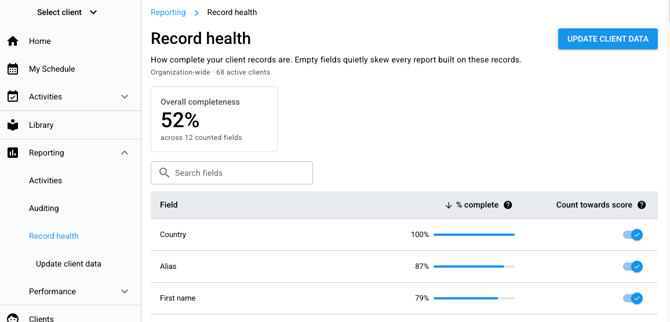
💡 Tip: Search the table to find a field, or click a column header to sort.
Note: Any saved value counts as filled, including options like "Other" or "Unknown." Fields managed in Lumary show the Lumary icon. Fix those gaps in Lumary.
⚙️ Choose which fields count
Not every field applies to every client. Choose the fields your organization expects every client to have, so the overall score reflects what matters to you.
- In the table, find the [Count towards score] column.
- Turn the toggle on for fields that should count, and off for fields that don't apply to everyone.
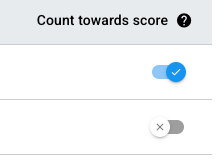
The overall score updates straight away. Your choice applies to everyone in your organization.
Note: Only users with Record health: Manage can change these toggles. Everyone else can see which fields count.
🛠️ Fill in missing data
- Click [Update client data] at the top right of Record health. You can also select it under Record health in the sidebar.
- The list opens on [Has gaps], with the clients missing the most information first. Choose [All clients] to see everyone, or search for a client.
- Click a highlighted empty cell and enter the value. Each field uses the same input as the client profile: a dropdown, a date picker or a text box.
Your change saves straight away and shows on the client's profile. The client's Gaps count updates as you go.
Note: Gaps only counts the fields your organization counts. Only fields with at least one missing value appear as columns, counted fields first.
🔐 Give your team access
Many gaps are best fixed by the person who knows the client, such as their BCBA.
- Select [Settings] >> [User Privileges].
- Turn on [Record health: Access and update] for the roles that should fill in data, such as Supervisor.
- Keep [Record health: Manage] for the people who decide which fields count.
Each person will only see the clients they already have access to.
Related articles
- Care Model: Getting Started
- Care Model: Grouping, Filtering and Saved Views
- Care Model: Exporting to Excel
❓ FAQ
1. What counts as missing?
An empty field. A multi-select field with nothing selected is empty. Date of birth counts for Age.
2. I fixed a field. Why hasn't the score changed?
Record health updates at its next data refresh. Check the "Data last refreshed" time at the top of the page.
3. Why can't I edit a cell?
The field is managed in Lumary, or you can't edit that field on the client's profile either.
4. Why don't I see all of our clients?
You only see clients you have access to. A Manager can check your client access.