
Steps to Trigger an Addendum in Camber
Steps to Complete an Addendum in Hi Rasmus
Important Notes:
-
Addendums only appear when a change has been made to Camber appointment fields after a note has been completed in Hi Rasmus.
-
The following field changes on an appointment trigger an addendum automatically:
-
[Service Code]
-
[Location]
-
- Addendums require the person who completed the note to sign the addendum regardless of whether there are additional signatures required on the original note.
Steps to Trigger an Addendum in Camber
1. In Camber, click the 3 dots in the upper right-hand corner of the appointment.
2. Click [View History]
*** Do not unlock the appointment from the Camber schedule.
An unlocked appointment stays unconfirmed and won’t be billed until confirmed again.
3. Click [Edit] in the upper right-hand corner of the page
4. Change the [Service Code] and/or [Location]
5. Click [Save]
Now the user who completed the note in Hi Rasmus will be notified to sign the addendum.
🎥 Watch: How to Complete an Addendum in Hi Rasmus
Steps to Complete an Addendum in Hi Rasmus
1. The user who completed the note will be notified to sign the addendum. The status of the addendum is [pending signature]
Example status:
-
The note is transferred to camber but the addendum is [pending signature]

-
The note is pending an additional signature and the addendum is [pending signature

2. The user will see an addendum attached to their activity and the changes that have been made.
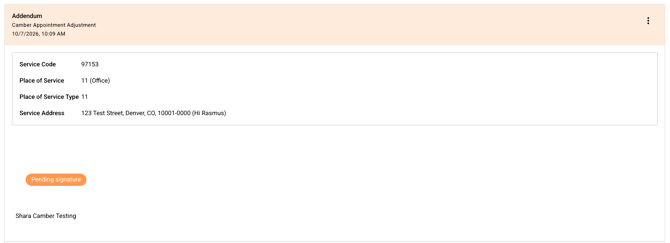
3. The user signs the addendum.
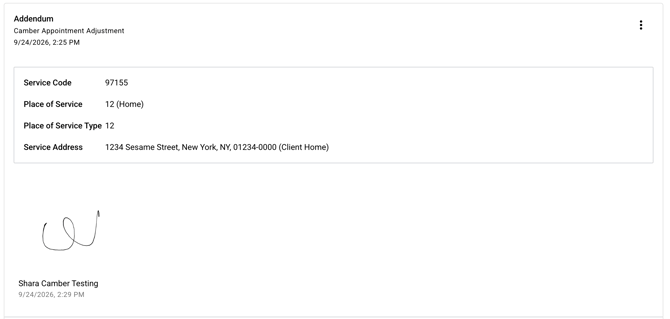
Now the addendum status is complete 

🎥 Watch: How to Audit Addendums