---
title: Setting Up Insights Graphs
description: Your data, graphed how you need it.
---
[Skip to content](https://help.hirasmus.com/knowledge/insights#main-content)
English
Show submenu for translations
[Request Support](https://help.hirasmus.com/knowledge/kb-tickets/new?hsLang=en) [Customer portal](https://help.hirasmus.com/helpdesk?hsLang=en)

Open main navigation
Close main navigation
- English
Show submenu for translations
- [Request Support](https://help.hirasmus.com/knowledge/kb-tickets/new)
- [Customer portal](https://help.hirasmus.com/helpdesk)
- hirasmus.com
hirasmus.com
Hi! How can we help you?
- There are no suggestions because the search field is empty.
1. [Hi Rasmus Help Center](https://help.hirasmus.com/knowledge?hsLang=en)
2. [Client Progress](https://help.hirasmus.com/knowledge/client-progress?hsLang=en)
3. [Reviewing Client Data](https://help.hirasmus.com/knowledge/client-progress?hsLang=en#reviewing-client-data)
January 6, 2026
# Setting Up Insights Graphs
## Your data, graphed how you need it.
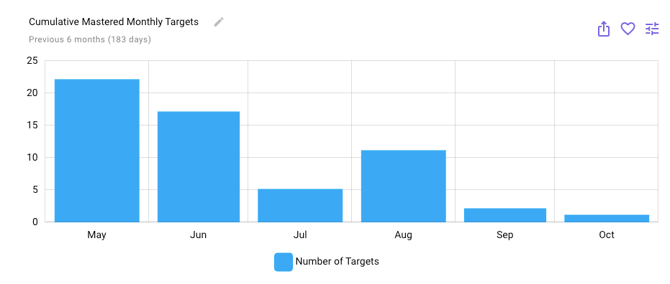
Creating Insights graphs is more effective than relying on a single program graph with adjustable settings because each saved graph captures a specific view of the data. This makes it easy to compare trends side-by-side, track different dimensions over time, and quickly return to the exact analysis you need without re-configuring filters every time. While a program graph can be adjusted to mimic an insight, Insights graphs let you build a library of consistent, reliable perspectives on your data that support deeper analysis and faster decision-making.
#### How to create a new insights graph
1. Select \[client\] from dropdown list
2. Select \[progress\]
3. Scroll to the very bottom and select \[new insights graph\]
4. Select your \[DATA SOURCE\]: This determines the source of the data being pulled onto the graph. (Each selection will adjust the options available on the x and y axis)
| \[Target\] | This uses the targets themselves as the data source instead of session data. This is most commonly used with cumulative and insights graphs. |
| --- | --- |
| \[Session Data\] | This is how you review progress for a client’s program. This will pull the data from the sessions that have been run. |
| \[Trial by Trial\] | This pulls in the data specifically for each trial. It is most commonly used for SBT but can be useful to analyze data on a trial level |
| \[Assessment Data\] | This will pull scores from assessments you have entered in for your client under progress \> assessment |
| \[Behavior Incident\] | This is used for ABC Data |
5. Select your \[X-AXIS\]:
| **Data Source** | **X-axis Options** |
| --- | --- |
| \[Target\] | Mastery Date (daily) - default Mastery Date (weekly) Mastery Date (monthly) Introduction Date (daily) Introduction Date (weekly) Introduction Date (monthly) Programs Targets |
| \[Session Data\] | Daily- default Weekly Monthly Session Program Targets Prompt Level User |
| \[Trial by Trial\] | Trial (by session) - default Trial (cumulative) Session Programs Targets Prompt Level User |
| \[Assessment Data\] | Administration - default Assessment Metric |
| \[Behavior Incident\] | Daily - default Weekly Monthly |
6. Select your \[Y-AXIS\]:
| **Data Source** | **Y-axis Options** |
| --- | --- |
| \[Target\] | Cumulative - default Number of targets Days active Sessions active |
| \[Session Data\] | Percentage: Percent Correct Percentage of Total Frequency: Count Rate: Rate per Minute Rate per Hour Rate per Day Learning Opportunities: Learning Opps Count Learning Opps per Minute Learning Opps per Hour Learning Opps per Day Learning Opps per Session Hour Duration: Total Observed Duration Min. Observed Duration Max. Observed Duration Avg. Observed Duration Prompting Fading: Prompt Success-Rate |
| \[Trial by Trial\] | Percent Correct Count Learning Opps Count Trial Duration Program: Target Prompt Level |
| \[Assessment Data\] | Score Min. Score Max. Score |
| \[Behavior Incident\] | Learning Opps Count Duration: Total Observed Duration Min. Observed Duration Max. Observed Duration Avg. Observed Duration |
7. Select a \[TIME PERIOD\]: This adjusts the time frame viewed on the graph so be sure to select your preference
8. Select \[FILTER\] settings: This allows you to narrow down or customize the information displayed on a graph. Filters help you apply conditions based on your data source, so the graph shows only the most relevant result
| **Data Source** | **Filter Options** |
| --- | --- |
| \[Target\] | Programs Tags Program Type Target Status |
| \[Session Data\] | Programs Tags Program Type Target Status Users |
| \[Trial by Trial\] | Programs Tags Program Type Target Status Users |
| \[Assessment Data\] | Assessments |
| \[Behavior Incident\] | Antecedent Behavior Consequence |
9. Select \[GROUPING\]: These settings allow you to group the data in different ways to see separate data paths.
| **Data Source** | **Grouping Options** |
| --- | --- |
| \[Target\] | No grouping Program Target |
| \[Session Data\] | No grouping Program Target Prompt Level User Hinted Prompt Level Mode |
| \[Trial by Trial\] | No grouping Program Target Prompt Level User Hinted Prompt Level Mode |
| \[Assessment Data\] | No grouping Administration Assessment Metric |
| \[Behavior Incident\] | No grouping Antecedent Behavior Consequence |
10. Select \[CHART TYPE\]: These settings change the chart type and how the data is visually displayed
|  | Line Chart |
| --- | --- |
|  | Column Chart |
|  | Stacked Column Chart |
|  | Logarithmic Line Chart |
|  | Scatterplot |
|  | Heatmap |
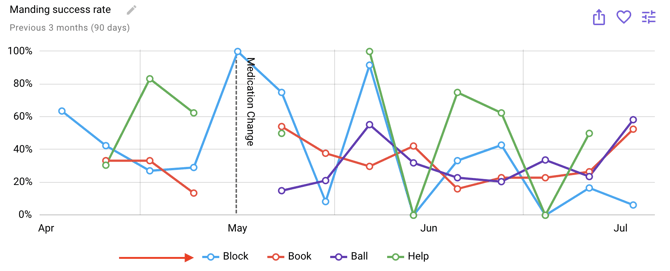
11. Select \[ANNOTATIONS\]: These settings cover trend lines, average lines, and phase change lines
12. Once your graph is set up to display the data you are looking for, select the \[purple heart\] in the upper right corner
1. 1. Give your insights graph a name
2. Choose to save this insights graph to only this client or all clients in your organization
**Please refer to [this](https://help.hirasmus.com/knowledge/navigating-graph-settings?hsLang=en) article on more detailed graph settings and definitions [here](https://help.hirasmus.com/knowledge/navigating-graph-settings?hsLang=en)**
**Quick Tip:** Efficiently remove programs from your view by selecting the program and/or target name or icon from the key below the graph. The corresponding data will disappear from the graph, and the program will appear in gray in the key. Want to add it back? Simply click on the program name again!
**Export your graph and / or data:**
Need to add your graph to a report? No problem! We have made exporting data simple and straightforward.
Select the  icon at the top right corner of your graph; here, you are offered options of exporting as an image (PNG, JPG, SVG, PDF), as data (JSON, CSV, XLSX, HTML, PDF), or a printed document.
---
-Updated October 2025
- [Getting Started](https://help.hirasmus.com/knowledge/getting-started?hsLang=en#main-content)
- [Quickstart Guide](https://help.hirasmus.com/knowledge/getting-started?hsLang=en#quickstart-guide)
- [Hi Rasmus 101: Using Hi Rasmus as a Behavior Technician](https://help.hirasmus.com/knowledge/getting-started?hsLang=en#hi-rasmus-101-using-hi-rasmus-as-a-behavior-technician)
- [Hi Rasmus 201: Hi Rasmus Guide for BCBAs / Behavior Analysts](https://help.hirasmus.com/knowledge/getting-started?hsLang=en#hi-rasmus-201-hi-rasmus-guide-for-bcbas-behavior-analysts)
- [Hi Rasmus 101: Using Hi Rasmus in a Multi-Disciplinary Setting](https://help.hirasmus.com/knowledge/getting-started?hsLang=en#hi-rasmus-101-using-hi-rasmus-in-a-multi-disciplinary-setting)
- [Managing Clients & Users](https://help.hirasmus.com/knowledge/managing-clients-users?hsLang=en#main-content)
- [Managing Clients](https://help.hirasmus.com/knowledge/managing-clients-users?hsLang=en#managing-clients)
- [Managing Users](https://help.hirasmus.com/knowledge/managing-clients-users?hsLang=en#managing-users)
- [Client \<\> User Access](https://help.hirasmus.com/knowledge/managing-clients-users?hsLang=en#client-user-access)
- [User Privileges](https://help.hirasmus.com/knowledge/managing-clients-users?hsLang=en#user-privileges)
- [Multi-factor Authentication (MFA)](https://help.hirasmus.com/knowledge/managing-clients-users?hsLang=en#multi-factor-authentication-mfa)
- [Single Sign On](https://help.hirasmus.com/knowledge/managing-clients-users?hsLang=en#single-sign-on)
- [Staff Licenses](https://help.hirasmus.com/knowledge/staff-licenses?hsLang=en)
- [Creating Programs](https://help.hirasmus.com/knowledge/creating-programs?hsLang=en#main-content)
- [Your Program Library](https://help.hirasmus.com/knowledge/creating-programs?hsLang=en#your-program-library)
- [Program Setup: Prompt Levels and Workflows](https://help.hirasmus.com/knowledge/creating-programs?hsLang=en#program-setup-prompt-levels-and-workflows)
- [Program Setup: Program Building Blocks](https://help.hirasmus.com/knowledge/creating-programs?hsLang=en#program-setup-program-building-blocks)
- [Creating Programs by Type](https://help.hirasmus.com/knowledge/creating-programs?hsLang=en#creating-programs-by-type)
- [Specific Program Capabilities](https://help.hirasmus.com/knowledge/creating-programs?hsLang=en#specific-program-capabilities)
- [Featured Programs and Library Catalog](https://help.hirasmus.com/knowledge/creating-programs?hsLang=en#featured-programs-and-library-catalog)
- [Client Progress](https://help.hirasmus.com/knowledge/client-progress?hsLang=en#main-content)
- [Reviewing Client Data](https://help.hirasmus.com/knowledge/client-progress?hsLang=en#reviewing-client-data)
- [Program Modifications](https://help.hirasmus.com/knowledge/client-progress?hsLang=en#program-modifications)
- [Client Progress Reports](https://help.hirasmus.com/knowledge/client-progress?hsLang=en#client-progress-reports)
- [Assessment Results](https://help.hirasmus.com/knowledge/client-progress?hsLang=en#assessment-results)
- [Exporting Data](https://help.hirasmus.com/knowledge/client-progress?hsLang=en#exporting-data)
- [Operational Tools, Reporting and Auditing](https://help.hirasmus.com/knowledge/operational-tools-reporting-and-auditing?hsLang=en#main-content)
- [Single Client Reporting / Auditing](https://help.hirasmus.com/knowledge/operational-tools-reporting-and-auditing?hsLang=en#single-client-reporting-auditing)
- [Cross Client Reporting / Auditing (Premium)](https://help.hirasmus.com/knowledge/operational-tools-reporting-and-auditing?hsLang=en#cross-client-reporting-auditing-premium)
- [Activity Time Change Requests](https://help.hirasmus.com/knowledge/operational-tools-reporting-and-auditing?hsLang=en#activity-time-change-requests)
- [Sessions](https://help.hirasmus.com/knowledge/sessions?hsLang=en#main-content)
- [Setting Up a Client Session](https://help.hirasmus.com/knowledge/sessions?hsLang=en#setting-up-a-client-session)
- [Running a Client Session](https://help.hirasmus.com/knowledge/sessions?hsLang=en#running-a-client-session)
- [Completing Session Notes](https://help.hirasmus.com/knowledge/sessions?hsLang=en#completing-session-notes)
- [Group Sessions](https://help.hirasmus.com/knowledge/sessions?hsLang=en#group-sessions)
- [Reviewing and Editing Sessions / Activities](https://help.hirasmus.com/knowledge/sessions?hsLang=en#reviewing-and-editing-sessions-activities)
- [Supervision Mode](https://help.hirasmus.com/knowledge/supervision-mode?hsLang=en#main-content)
- [Supervision Criteria](https://help.hirasmus.com/knowledge/supervision-mode?hsLang=en#supervision-criteria)
- [Supervising Live Sessions](https://help.hirasmus.com/knowledge/supervision-mode?hsLang=en#supervising-live-sessions)
- [Supervision Session Notes](https://help.hirasmus.com/knowledge/supervision-mode?hsLang=en#supervision-session-notes)
- [Templates](https://help.hirasmus.com/knowledge/templates?hsLang=en#main-content)
- [Session Notes](https://help.hirasmus.com/knowledge/templates?hsLang=en#session-notes)
- [Forms](https://help.hirasmus.com/knowledge/templates?hsLang=en#forms)
- [Treatment Plans and Progress Reports](https://help.hirasmus.com/knowledge/templates?hsLang=en#treatment-plans-and-progress-reports)
- [Activity Types](https://help.hirasmus.com/knowledge/templates?hsLang=en#activity-types)
- [Integrations](https://help.hirasmus.com/knowledge/integrations?hsLang=en#main-content)
- [Aloha ABA Integration](https://help.hirasmus.com/knowledge/integrations?hsLang=en#aloha-aba-integration)
- [Aloha Integration: FAQ And Troubleshooting](https://help.hirasmus.com/knowledge/integrations?hsLang=en#aloha-integration-faq-and-troubleshooting)
- [Lumary Integration: Overview](https://help.hirasmus.com/knowledge/integrations?hsLang=en#lumary-integration-overview)
- [Lumary Integration: Set Up](https://help.hirasmus.com/knowledge/integrations?hsLang=en#lumary-integration-set-up)
- [Lumary Integration: Running and Reviewing Sessions](https://help.hirasmus.com/knowledge/integrations?hsLang=en#lumary-integration-running-and-reviewing-sessions)
- [Lumary Integration: FAQ and Troubleshooting](https://help.hirasmus.com/knowledge/integrations?hsLang=en#lumary-integration-faq-and-troubleshooting)
- [TherapyPM](https://help.hirasmus.com/knowledge/integrations?hsLang=en#therapypm)
- [Boost Integration: Overview](https://help.hirasmus.com/knowledge/integrations?hsLang=en#boost-integration-overview)
- [Boost Integration: Set Up](https://help.hirasmus.com/knowledge/integrations?hsLang=en#boost-integration-set-up)
- [Boost Integration: Running and Reviewing Sessions](https://help.hirasmus.com/knowledge/integrations?hsLang=en#boost-integration-running-and-reviewing-sessions)
- [Boost Integration: FAQ and Troubleshooting](https://help.hirasmus.com/knowledge/integrations?hsLang=en#boost-integration-faq-and-troubleshooting)
- [Camber Integration: Overview](https://help.hirasmus.com/knowledge/integrations?hsLang=en#camber-integration-overview)
- [Camber Integration: Set up](https://help.hirasmus.com/knowledge/integrations?hsLang=en#camber-integration-set-up)
- [Camber: Running and Reviewing Sessions](https://help.hirasmus.com/knowledge/integrations?hsLang=en#camber-running-and-reviewing-sessions)
- [Camber: FAQ and Troubleshooting](https://help.hirasmus.com/knowledge/integrations?hsLang=en#camber-faq-and-troubleshooting)
- [Offline Mode](https://help.hirasmus.com/knowledge/offline-mode?hsLang=en)
- [Parents](https://help.hirasmus.com/knowledge/parents?hsLang=en)
- [RBT Training](https://help.hirasmus.com/knowledge/rbt-training?hsLang=en)
- [Outcomes](https://help.hirasmus.com/knowledge/outcomes?hsLang=en#main-content)
- [Data Accessibility](https://help.hirasmus.com/knowledge/outcomes?hsLang=en#data-accessibility)
- [AI](https://help.hirasmus.com/knowledge/ai?hsLang=en)
- [Scheduling](https://help.hirasmus.com/knowledge/scheduling?hsLang=en#main-content)
- [🏁 Scheduling: Getting Started](https://help.hirasmus.com/knowledge/scheduling?hsLang=en#scheduling-getting-started)
- [🛠️ Scheduling: Set Up](https://help.hirasmus.com/knowledge/scheduling?hsLang=en#%EF%B8%8F-scheduling-set-up)
- [⚙️ Scheduling: Calendar Views and Settings](https://help.hirasmus.com/knowledge/scheduling?hsLang=en#%EF%B8%8F-scheduling-calendar-views-and-settings)
- [📆 Scheduling: Creating and Updating Appointments and Events](https://help.hirasmus.com/knowledge/scheduling?hsLang=en#scheduling-creating-and-updating-appointments-and-events)
- [✅ Scheduling: Completing Scheduled Appointments](https://help.hirasmus.com/knowledge/scheduling?hsLang=en#scheduling-completing-scheduled-appointments)
- [📈 Scheduling: Appointments Reporting](https://help.hirasmus.com/knowledge/scheduling?hsLang=en#scheduling-appointments-reporting)
- [Frequently Asked Questions](https://help.hirasmus.com/knowledge/frequently-asked-questions?hsLang=en#main-content)
- [Subscription and Invoices](https://help.hirasmus.com/knowledge/frequently-asked-questions?hsLang=en#subscription-and-invoices)
- [Device and App Info](https://help.hirasmus.com/knowledge/frequently-asked-questions?hsLang=en#device-and-app-info)
- [Recovering Deleted Items](https://help.hirasmus.com/knowledge/frequently-asked-questions?hsLang=en#recovering-deleted-items)
- [Settings](https://help.hirasmus.com/knowledge/settings?hsLang=en)
- [New and Coming Soon!](https://help.hirasmus.com/knowledge/new-and-coming-soon?hsLang=en)
[](https://hirasmus.com)
Help Center
Copyright © 2026, Hi Rasmus Inc.