---
title: How to Create and Use a Sufficient Exemplar Training (SET) Program
description: Learn the ins and outs of Sufficient Exemplar Training (SET) in Hi Rasmus
---
[Skip to content](https://help.hirasmus.com/knowledge/sufficient-exemplar-training-program#main-content)
English
Show submenu for translations
[Request Support](https://help.hirasmus.com/knowledge/kb-tickets/new?hsLang=en) [Customer portal](https://help.hirasmus.com/helpdesk?hsLang=en)

Open main navigation
Close main navigation
- English
Show submenu for translations
- [Request Support](https://help.hirasmus.com/knowledge/kb-tickets/new)
- [Customer portal](https://help.hirasmus.com/helpdesk)
- hirasmus.com
hirasmus.com
Hi! How can we help you?
- There are no suggestions because the search field is empty.
1. [Hi Rasmus Help Center](https://help.hirasmus.com/knowledge?hsLang=en)
2. [Creating Programs](https://help.hirasmus.com/knowledge/creating-programs?hsLang=en)
3. [Creating Programs by Type](https://help.hirasmus.com/knowledge/creating-programs?hsLang=en#creating-programs-by-type)
February 10, 2026
# How to Create and Use a Sufficient Exemplar Training (SET) Program
This article walks you through how to create and run a **Sufficient Exemplar Training (SET)** program in Hi Rasmus. You’ll learn:
- When SET is the right program type to use
- How a SET program progresses through each phase
- Mastery criteria at each phase
- Recommended program setup to avoid common issues
- Helpful graph views to visualize learner progress
SET is designed to help learners generalize skills efficiently—so you can focus on teaching meaningful skills, not unnecessary targets.
---
#### **What Is Sufficient Exemplar Training (SET)?**
Sufficient Exemplar Training is a teaching strategy used when the goal is **generative responding**—the learner demonstrates understanding of a rule or concept and applies it correctly to new, untrained examples.
Rather than teaching every possible target, SET allows you to:
- Teach one example at a time
- Probe for generalization early
- Stop teaching once the learner demonstrates the skill with novel targets
SET focuses on learning the rule, not mastering every target. The program structure in Hi Rasmus is intentionally designed to save valuable instructional time by reducing unnecessary teaching and confirming generalization as early as possible. This approach is grounded in research on Sufficient Exemplar Training, which demonstrates that many learners can show generative responding after relatively few teaching trials, allowing instruction to end once the concept is acquired rather than continuing through redundant targets
SET is especially effective for skills such as:
- Imitation
- Matching
- Early language concepts
- Grammar rules (e.g., past tense verbs)
---
#### **When to Use SET**
SET is often a good fit if you’re aiming to:
- Run **mass trials** during teaching
- Rotate targets once a learner shows mastery
- Save instructional time
- End the program once the learner "gets it"
If the skill is truly generative, SET allows you to confirm generalization without over-teaching.
---
#### **How a SET Program Progresses**
A SET program in Hi Rasmus progresses automatically through four phases. No workflow setup is required—the program drives the progression for you.
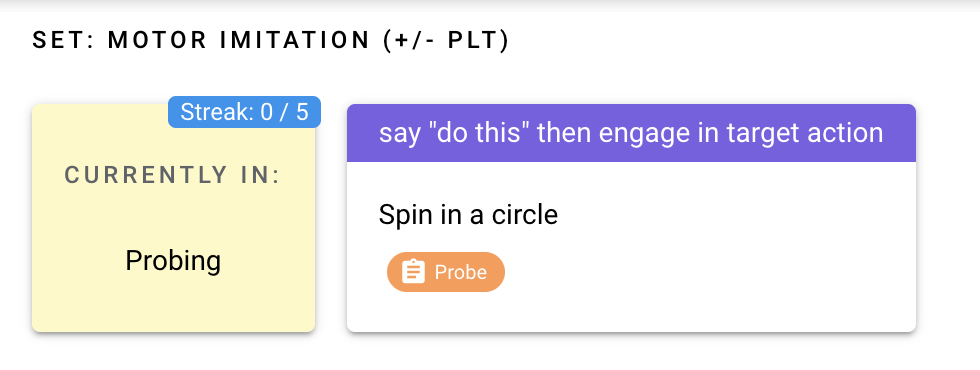
### **Phase 1: Probe Phase**
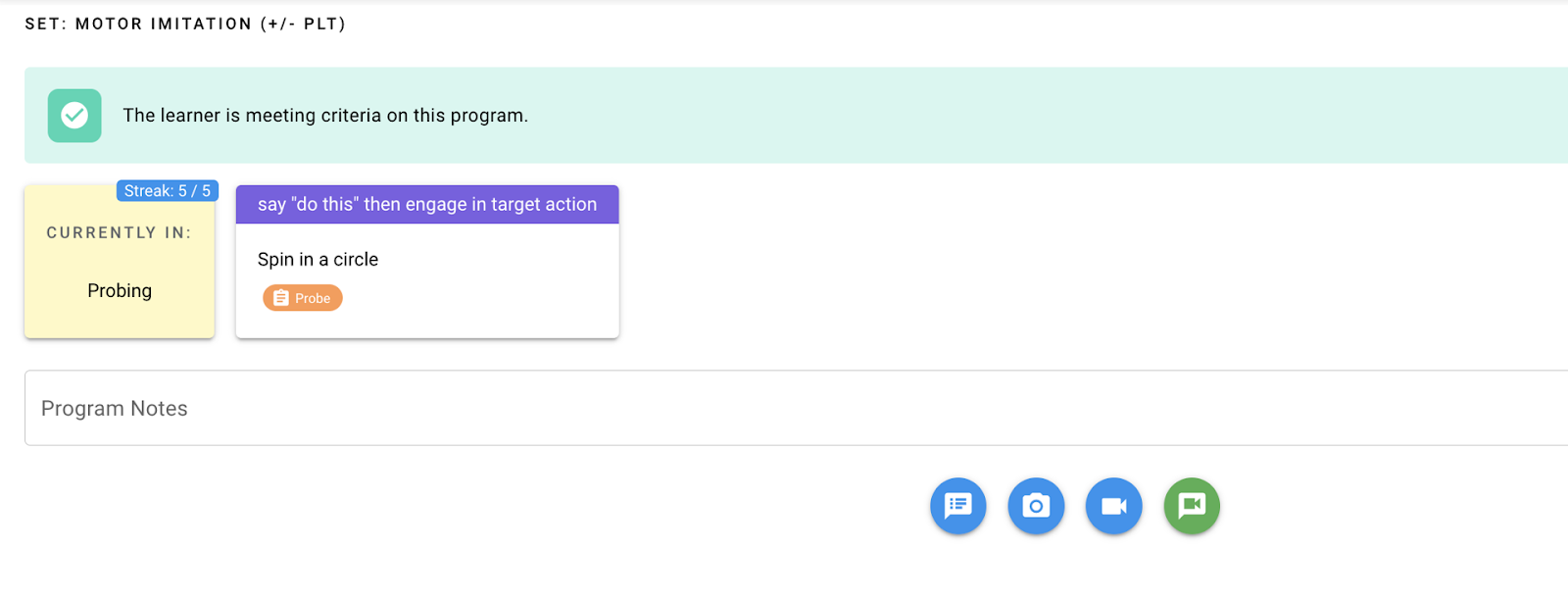
The program begins by probing targets to determine whether the learner already demonstrates the skill.
**How it works:**
- One target is open; the remaining targets are in a waiting state
- Each probe is run once
**Progression rules:**
- Correct response → moves to the next probe
- Incorrect response → moves into the Teaching Phase
**Mastery criteria:**
- **5 consecutive independent and correct probes**
If mastery is met during probing, the entire program ends—no teaching is needed.
---
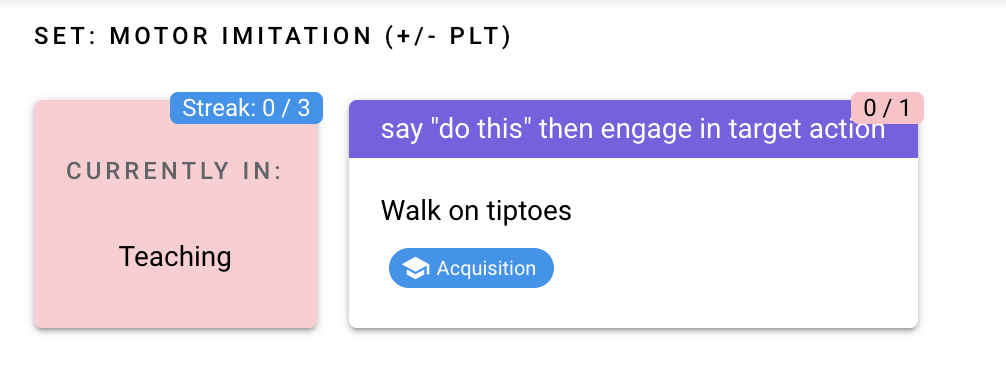
### **Phase 2: Teaching Phase (Mass Trials)**
If a learner responds incorrectly during a probe, the program moves into teaching.
**How it works:**
- The target is run in mass trials
- The learner practices the same target repeatedly
**Mastery criteria:**
- **3 consecutive independent and correct responses**
Once this criterion is met, the program advances to the Generalization Phase.
---
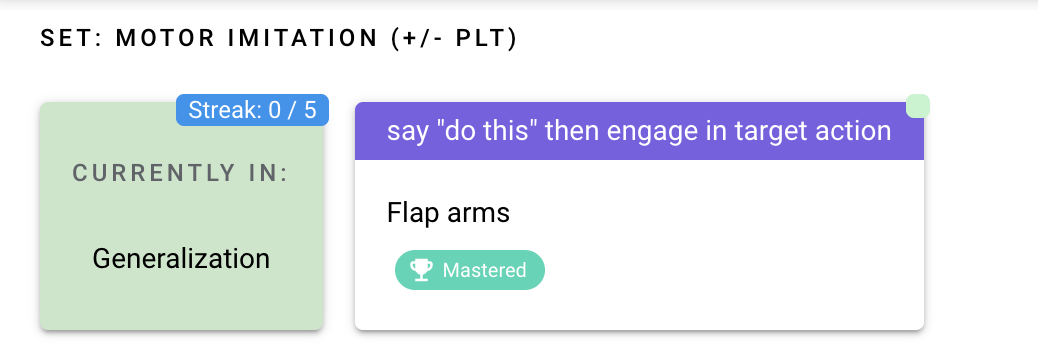
### **Phase 3: Generalization Phase (Random Rotation)**
In this phase, the learner is asked to demonstrate the skill across multiple previously taught targets.
**How it works:**
- Up to **3 mastered targets** are rotated randomly
**Mastery criteria:**
- **5 consecutive independent and correct responses across targets**
When this criterion is met, the program advances to the Novel Probe Phase.
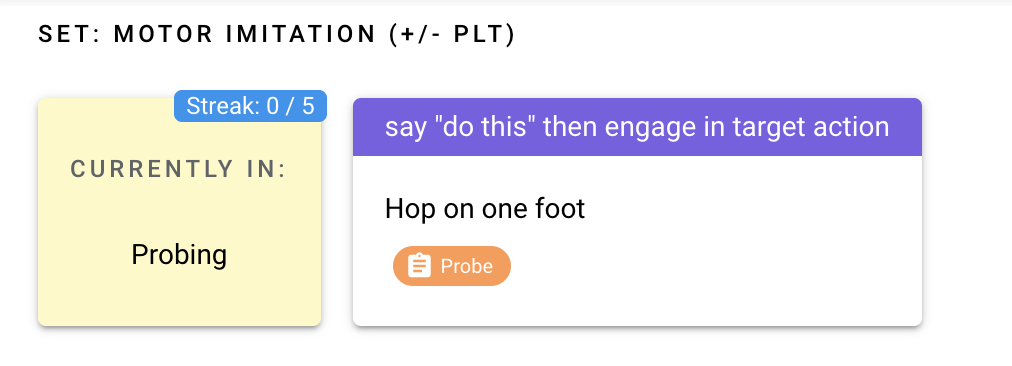
### **Phase 4: Novel Probe Phase**
This phase confirms whether the learner can apply the skill to **new, untrained targets**.
**How it works:**
- New targets are probed one at a time
**Mastery criteria:**
- **5 novel targets correct in a row**
**If an error occurs:**
- The program returns to Teaching → Generalization → Novel Probe
**If mastery is met:**
- The skill is considered mastered
- The program ends
---
#### **Recommended Program Setup**
Proper setup is critical to ensure SET progresses as expected.
### **Target Setup**
- **Create 15 or more targets** when building the program
- Extra targets are encouraged and will not negatively impact the program
⚠️ Not having enough targets is one of the most common reasons a SET program cannot progress.
This is also a great time to consider using Hi Rasmus’ AI features to help generate target lists efficiently. To learn more about AI Target Suggestion, click**[HERE](https://help.hirasmus.com/knowledge/ai-target-suggestions?hsLang=en).**
---
### **Prompt Level Template (PLT)**
Choose a prompt level setup that aligns with how you want to visualize progress.
Recommended options:
- **Simple + / – prompt levels**
- **Prompt hierarchy PLT** (weighted values are not required - **see how trial-by-trial graph settings** can distribute across the Y-axis for easy visual analysis)
To learn more about Setting up Prompt Level Templates, click**[HERE](https://help.hirasmus.com/knowledge/customizing-prompt-levels?hsLang=en).**
---
#### **Helpful Graph Views for SET Programs**
Graphing allows you to clearly see how the learner progresses through each SET phase.
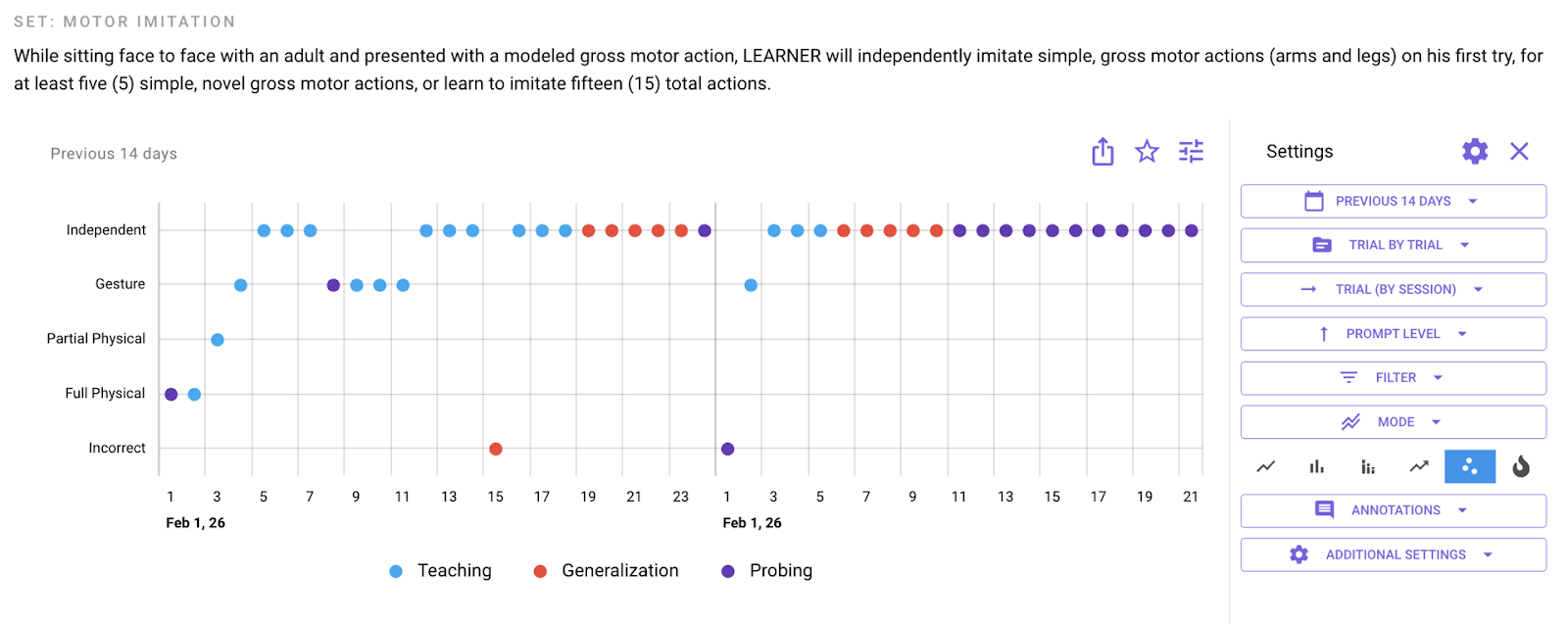
### **Mode / Prompt Level Graph**
- Shows independence across trials
- Useful for tracking when mastery criteria are met
**Best used with:**
- Prompt hierarchy PLT
---
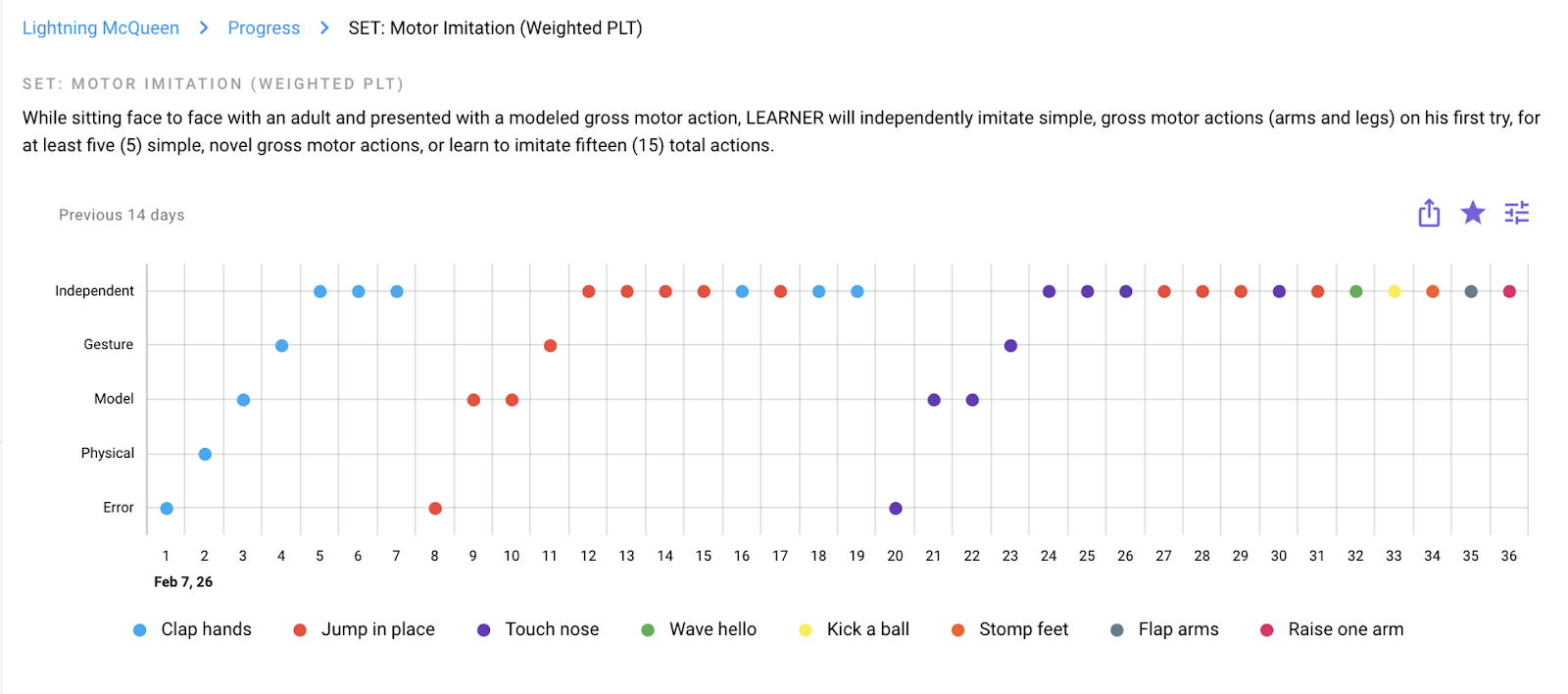
### **Target / Prompt Level Graph**
This view helps visualize how learning unfolds across targets.
You can clearly see:
- When a target meets teaching criteria and a new target is introduced
- When generalization across multiple targets occurs
- When novel targets are answered independently, signaling program completion
---
#### **Workflow and Maintenance**
- **No workflow setup is required**
- SET progression is fully program-driven
- **No maintenance phase** is included
Once generalization is demonstrated with novel targets, the program is complete.
---
#### **Why Hi Rasmus Supports SET**
SET is built directly into Hi Rasmus to support efficient, evidence-based teaching. The platform:
- Guides clinicians through each phase automatically
- Applies mastery criteria consistently
- Reduces decision fatigue and setup errors
- Visualizes progress in real time
By automating the mechanics of SET, Hi Rasmus helps your team spend less time managing programs and more time focused on the learner in front of them.
- [Getting Started](https://help.hirasmus.com/knowledge/getting-started?hsLang=en#main-content)
- [Quickstart Guide](https://help.hirasmus.com/knowledge/getting-started?hsLang=en#quickstart-guide)
- [Hi Rasmus 101: Using Hi Rasmus as a Behavior Technician](https://help.hirasmus.com/knowledge/getting-started?hsLang=en#hi-rasmus-101-using-hi-rasmus-as-a-behavior-technician)
- [Hi Rasmus 201: Hi Rasmus Guide for BCBAs / Behavior Analysts](https://help.hirasmus.com/knowledge/getting-started?hsLang=en#hi-rasmus-201-hi-rasmus-guide-for-bcbas-behavior-analysts)
- [Hi Rasmus 101: Using Hi Rasmus in a Multi-Disciplinary Setting](https://help.hirasmus.com/knowledge/getting-started?hsLang=en#hi-rasmus-101-using-hi-rasmus-in-a-multi-disciplinary-setting)
- [Managing Clients & Users](https://help.hirasmus.com/knowledge/managing-clients-users?hsLang=en#main-content)
- [Managing Clients](https://help.hirasmus.com/knowledge/managing-clients-users?hsLang=en#managing-clients)
- [Managing Users](https://help.hirasmus.com/knowledge/managing-clients-users?hsLang=en#managing-users)
- [Client \<\> User Access](https://help.hirasmus.com/knowledge/managing-clients-users?hsLang=en#client-user-access)
- [User Privileges](https://help.hirasmus.com/knowledge/managing-clients-users?hsLang=en#user-privileges)
- [Multi-factor Authentication (MFA)](https://help.hirasmus.com/knowledge/managing-clients-users?hsLang=en#multi-factor-authentication-mfa)
- [Single Sign On](https://help.hirasmus.com/knowledge/managing-clients-users?hsLang=en#single-sign-on)
- [Staff Licenses](https://help.hirasmus.com/knowledge/staff-licenses?hsLang=en)
- [Creating Programs](https://help.hirasmus.com/knowledge/creating-programs?hsLang=en#main-content)
- [Your Program Library](https://help.hirasmus.com/knowledge/creating-programs?hsLang=en#your-program-library)
- [Program Setup: Prompt Levels and Workflows](https://help.hirasmus.com/knowledge/creating-programs?hsLang=en#program-setup-prompt-levels-and-workflows)
- [Program Setup: Program Building Blocks](https://help.hirasmus.com/knowledge/creating-programs?hsLang=en#program-setup-program-building-blocks)
- [Creating Programs by Type](https://help.hirasmus.com/knowledge/creating-programs?hsLang=en#creating-programs-by-type)
- [Specific Program Capabilities](https://help.hirasmus.com/knowledge/creating-programs?hsLang=en#specific-program-capabilities)
- [Featured Programs and Library Catalog](https://help.hirasmus.com/knowledge/creating-programs?hsLang=en#featured-programs-and-library-catalog)
- [Client Progress](https://help.hirasmus.com/knowledge/client-progress?hsLang=en#main-content)
- [Reviewing Client Data](https://help.hirasmus.com/knowledge/client-progress?hsLang=en#reviewing-client-data)
- [Program Modifications](https://help.hirasmus.com/knowledge/client-progress?hsLang=en#program-modifications)
- [Client Progress Reports](https://help.hirasmus.com/knowledge/client-progress?hsLang=en#client-progress-reports)
- [Assessment Results](https://help.hirasmus.com/knowledge/client-progress?hsLang=en#assessment-results)
- [Exporting Data](https://help.hirasmus.com/knowledge/client-progress?hsLang=en#exporting-data)
- [Operational Tools, Reporting and Auditing](https://help.hirasmus.com/knowledge/operational-tools-reporting-and-auditing?hsLang=en#main-content)
- [Single Client Reporting / Auditing](https://help.hirasmus.com/knowledge/operational-tools-reporting-and-auditing?hsLang=en#single-client-reporting-auditing)
- [Cross Client Reporting / Auditing (Premium)](https://help.hirasmus.com/knowledge/operational-tools-reporting-and-auditing?hsLang=en#cross-client-reporting-auditing-premium)
- [Activity Time Change Requests](https://help.hirasmus.com/knowledge/operational-tools-reporting-and-auditing?hsLang=en#activity-time-change-requests)
- [Sessions](https://help.hirasmus.com/knowledge/sessions?hsLang=en#main-content)
- [Setting Up a Client Session](https://help.hirasmus.com/knowledge/sessions?hsLang=en#setting-up-a-client-session)
- [Running a Client Session](https://help.hirasmus.com/knowledge/sessions?hsLang=en#running-a-client-session)
- [Completing Session Notes](https://help.hirasmus.com/knowledge/sessions?hsLang=en#completing-session-notes)
- [Group Sessions](https://help.hirasmus.com/knowledge/sessions?hsLang=en#group-sessions)
- [Reviewing and Editing Sessions / Activities](https://help.hirasmus.com/knowledge/sessions?hsLang=en#reviewing-and-editing-sessions-activities)
- [Supervision Mode](https://help.hirasmus.com/knowledge/supervision-mode?hsLang=en#main-content)
- [Supervision Criteria](https://help.hirasmus.com/knowledge/supervision-mode?hsLang=en#supervision-criteria)
- [Supervising Live Sessions](https://help.hirasmus.com/knowledge/supervision-mode?hsLang=en#supervising-live-sessions)
- [Supervision Session Notes](https://help.hirasmus.com/knowledge/supervision-mode?hsLang=en#supervision-session-notes)
- [Templates](https://help.hirasmus.com/knowledge/templates?hsLang=en#main-content)
- [Session Notes](https://help.hirasmus.com/knowledge/templates?hsLang=en#session-notes)
- [Forms](https://help.hirasmus.com/knowledge/templates?hsLang=en#forms)
- [Treatment Plans and Progress Reports](https://help.hirasmus.com/knowledge/templates?hsLang=en#treatment-plans-and-progress-reports)
- [Activity Types](https://help.hirasmus.com/knowledge/templates?hsLang=en#activity-types)
- [Integrations](https://help.hirasmus.com/knowledge/integrations?hsLang=en#main-content)
- [Aloha ABA Integration](https://help.hirasmus.com/knowledge/integrations?hsLang=en#aloha-aba-integration)
- [Aloha Integration: FAQ And Troubleshooting](https://help.hirasmus.com/knowledge/integrations?hsLang=en#aloha-integration-faq-and-troubleshooting)
- [Lumary Integration: Overview](https://help.hirasmus.com/knowledge/integrations?hsLang=en#lumary-integration-overview)
- [Lumary Integration: Set Up](https://help.hirasmus.com/knowledge/integrations?hsLang=en#lumary-integration-set-up)
- [Lumary Integration: Running and Reviewing Sessions](https://help.hirasmus.com/knowledge/integrations?hsLang=en#lumary-integration-running-and-reviewing-sessions)
- [Lumary Integration: FAQ and Troubleshooting](https://help.hirasmus.com/knowledge/integrations?hsLang=en#lumary-integration-faq-and-troubleshooting)
- [Boost Integration: Overview](https://help.hirasmus.com/knowledge/integrations?hsLang=en#boost-integration-overview)
- [Boost Integration: Set Up](https://help.hirasmus.com/knowledge/integrations?hsLang=en#boost-integration-set-up)
- [Boost Integration: Running and Reviewing Sessions](https://help.hirasmus.com/knowledge/integrations?hsLang=en#boost-integration-running-and-reviewing-sessions)
- [Boost Integration: FAQ and Troubleshooting](https://help.hirasmus.com/knowledge/integrations?hsLang=en#boost-integration-faq-and-troubleshooting)
- [Camber Integration: Overview](https://help.hirasmus.com/knowledge/integrations?hsLang=en#camber-integration-overview)
- [Camber Integration: Set up](https://help.hirasmus.com/knowledge/integrations?hsLang=en#camber-integration-set-up)
- [Camber: Running and Reviewing Sessions](https://help.hirasmus.com/knowledge/integrations?hsLang=en#camber-running-and-reviewing-sessions)
- [Camber: FAQ and Troubleshooting](https://help.hirasmus.com/knowledge/integrations?hsLang=en#camber-faq-and-troubleshooting)
- [TherapyPM](https://help.hirasmus.com/knowledge/integrations?hsLang=en#therapypm)
- [Offline Mode](https://help.hirasmus.com/knowledge/offline-mode?hsLang=en)
- [Parents](https://help.hirasmus.com/knowledge/parents?hsLang=en)
- [RBT Training](https://help.hirasmus.com/knowledge/rbt-training?hsLang=en)
- [Outcomes](https://help.hirasmus.com/knowledge/outcomes?hsLang=en#main-content)
- [Data Accessibility](https://help.hirasmus.com/knowledge/outcomes?hsLang=en#data-accessibility)
- [AI](https://help.hirasmus.com/knowledge/ai?hsLang=en#main-content)
- [AI Note Auditor](https://help.hirasmus.com/knowledge/ai?hsLang=en#ai-note-auditor)
- [Scheduling](https://help.hirasmus.com/knowledge/scheduling?hsLang=en#main-content)
- [🏁 Scheduling: Getting Started](https://help.hirasmus.com/knowledge/scheduling?hsLang=en#scheduling-getting-started)
- [🛠️ Scheduling: Set Up](https://help.hirasmus.com/knowledge/scheduling?hsLang=en#%EF%B8%8F-scheduling-set-up)
- [⚙️ Scheduling: Calendar Views and Settings](https://help.hirasmus.com/knowledge/scheduling?hsLang=en#%EF%B8%8F-scheduling-calendar-views-and-settings)
- [📆 Scheduling: Creating and Updating Appointments and Events](https://help.hirasmus.com/knowledge/scheduling?hsLang=en#scheduling-creating-and-updating-appointments-and-events)
- [✅ Scheduling: Completing Scheduled Appointments](https://help.hirasmus.com/knowledge/scheduling?hsLang=en#scheduling-completing-scheduled-appointments)
- [📈 Scheduling: Appointments Reporting](https://help.hirasmus.com/knowledge/scheduling?hsLang=en#scheduling-appointments-reporting)
- [Frequently Asked Questions](https://help.hirasmus.com/knowledge/frequently-asked-questions?hsLang=en#main-content)
- [Subscription and Invoices](https://help.hirasmus.com/knowledge/frequently-asked-questions?hsLang=en#subscription-and-invoices)
- [Device and App Info](https://help.hirasmus.com/knowledge/frequently-asked-questions?hsLang=en#device-and-app-info)
- [Recovering Deleted Items](https://help.hirasmus.com/knowledge/frequently-asked-questions?hsLang=en#recovering-deleted-items)
- [Settings](https://help.hirasmus.com/knowledge/settings?hsLang=en)
- [New and Coming Soon!](https://help.hirasmus.com/knowledge/new-and-coming-soon?hsLang=en#main-content)
- [Coming Soon](https://help.hirasmus.com/knowledge/new-and-coming-soon?hsLang=en#coming-soon)
[](https://hirasmus.com)
Help Center
Copyright © 2026, Hi Rasmus Inc.